 GuroHub
Digital E-Class Record for Grade 4–12
Encode scores once. GuroHub computes the grade, and the SF9 builds itself. Finalize, and your adviser gets your grades right away while your school head reviews them online.
You encode, it computes
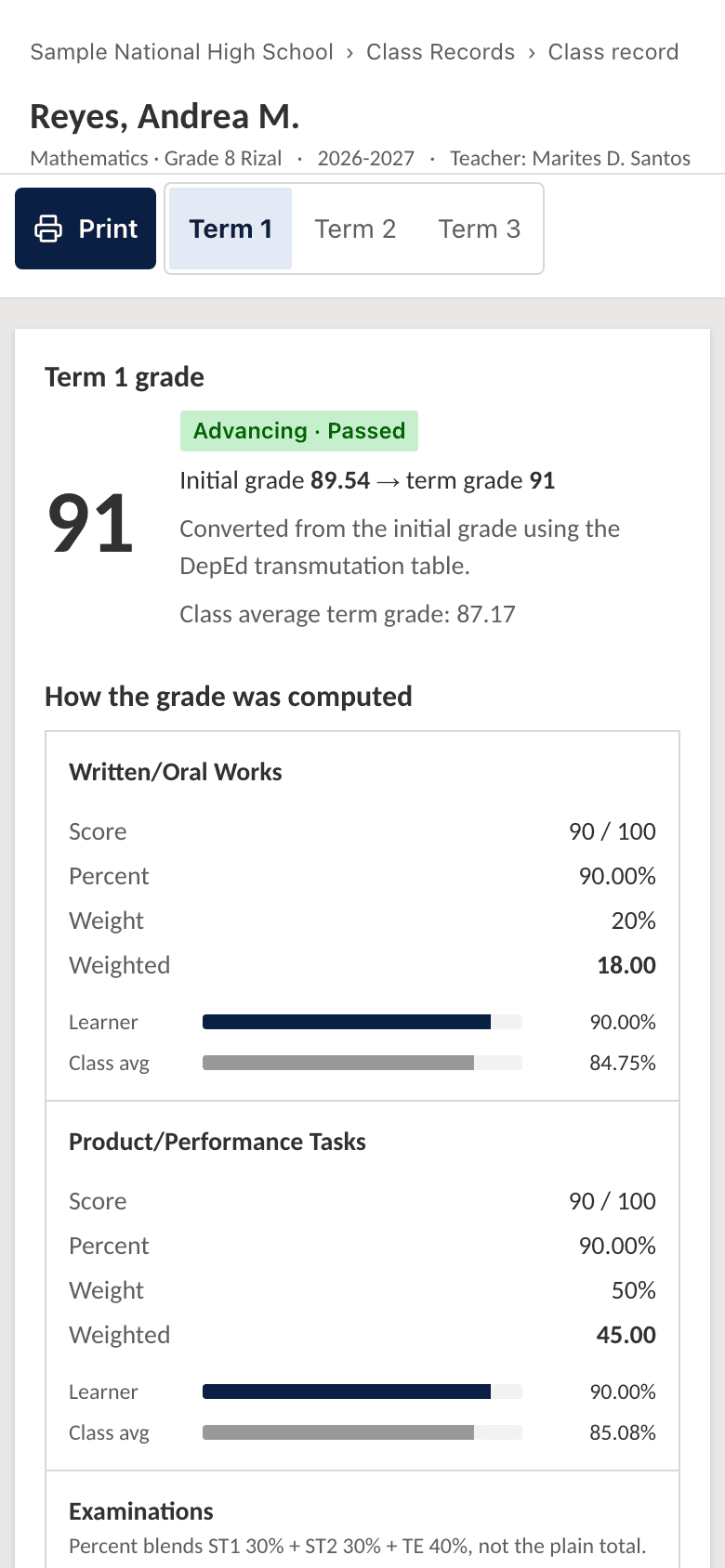
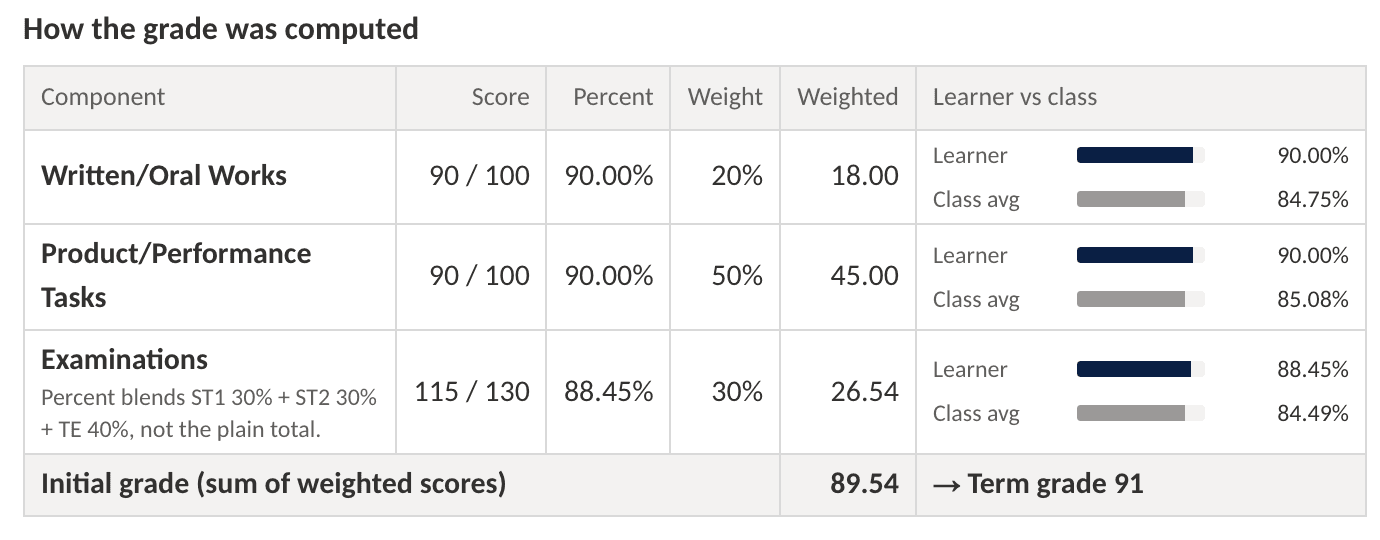
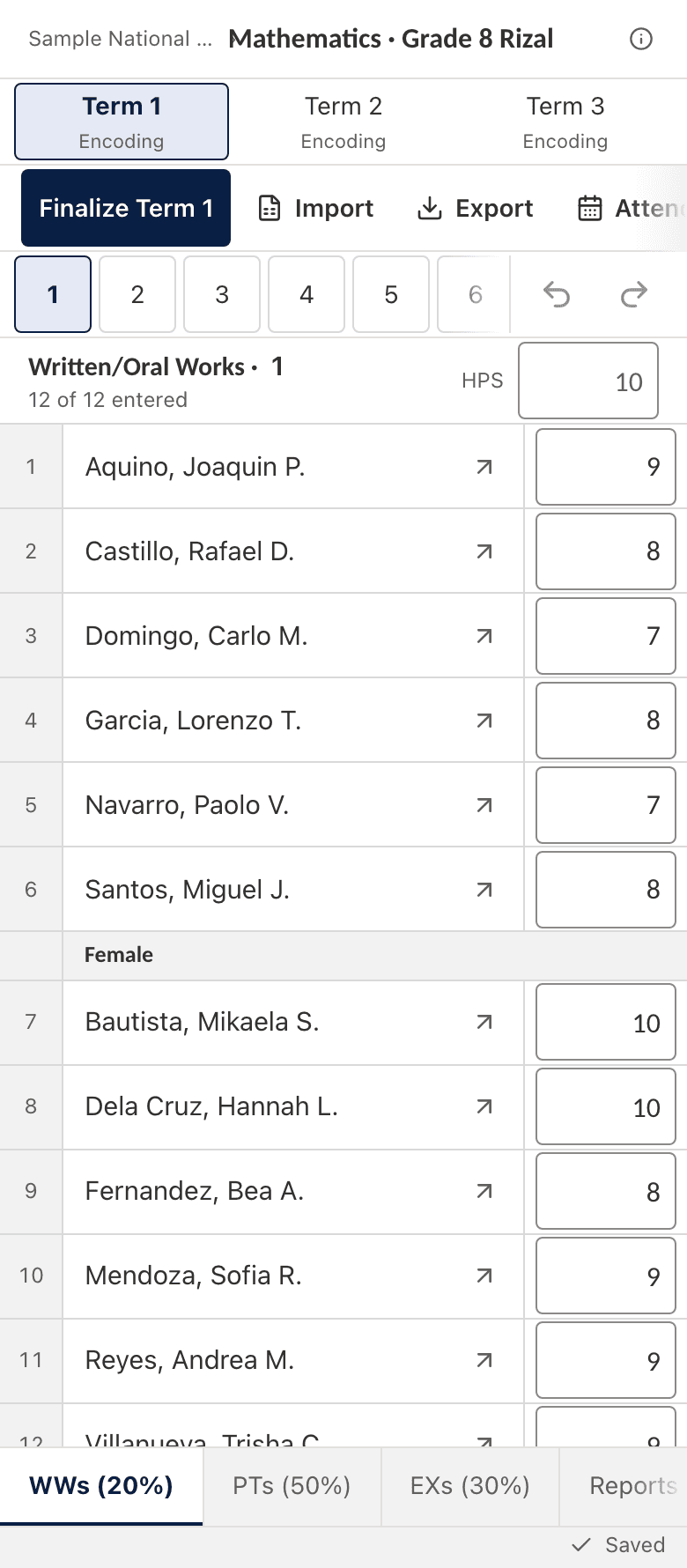
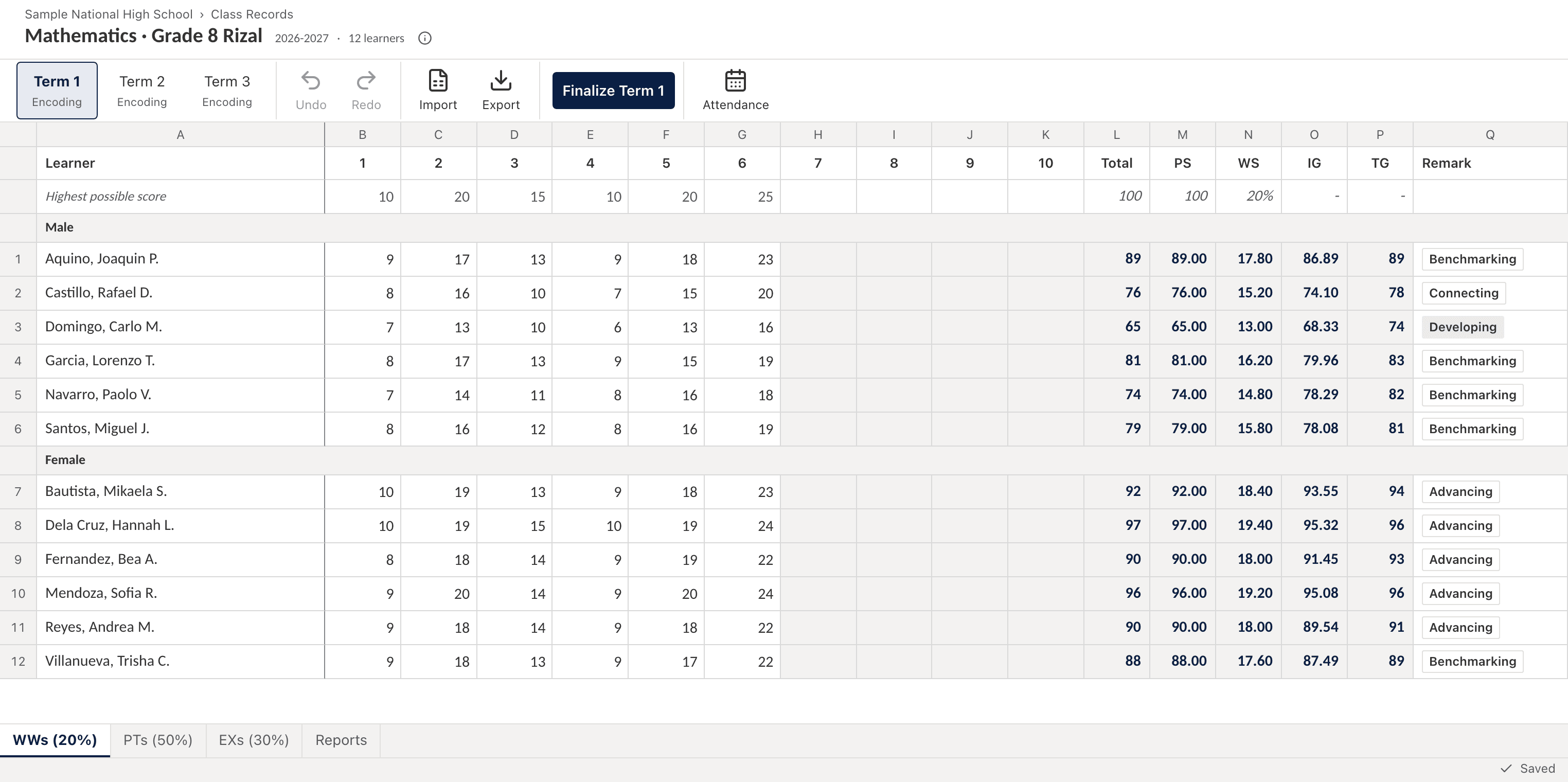
Encode learner scores once. GuroHub computes initial and transmuted grades automatically, so end-of-term computation stops being a weekend of spreadsheet formulas. You can encode and use undo and redo from your phone.
SF9 builds itself, and grades reach the adviser
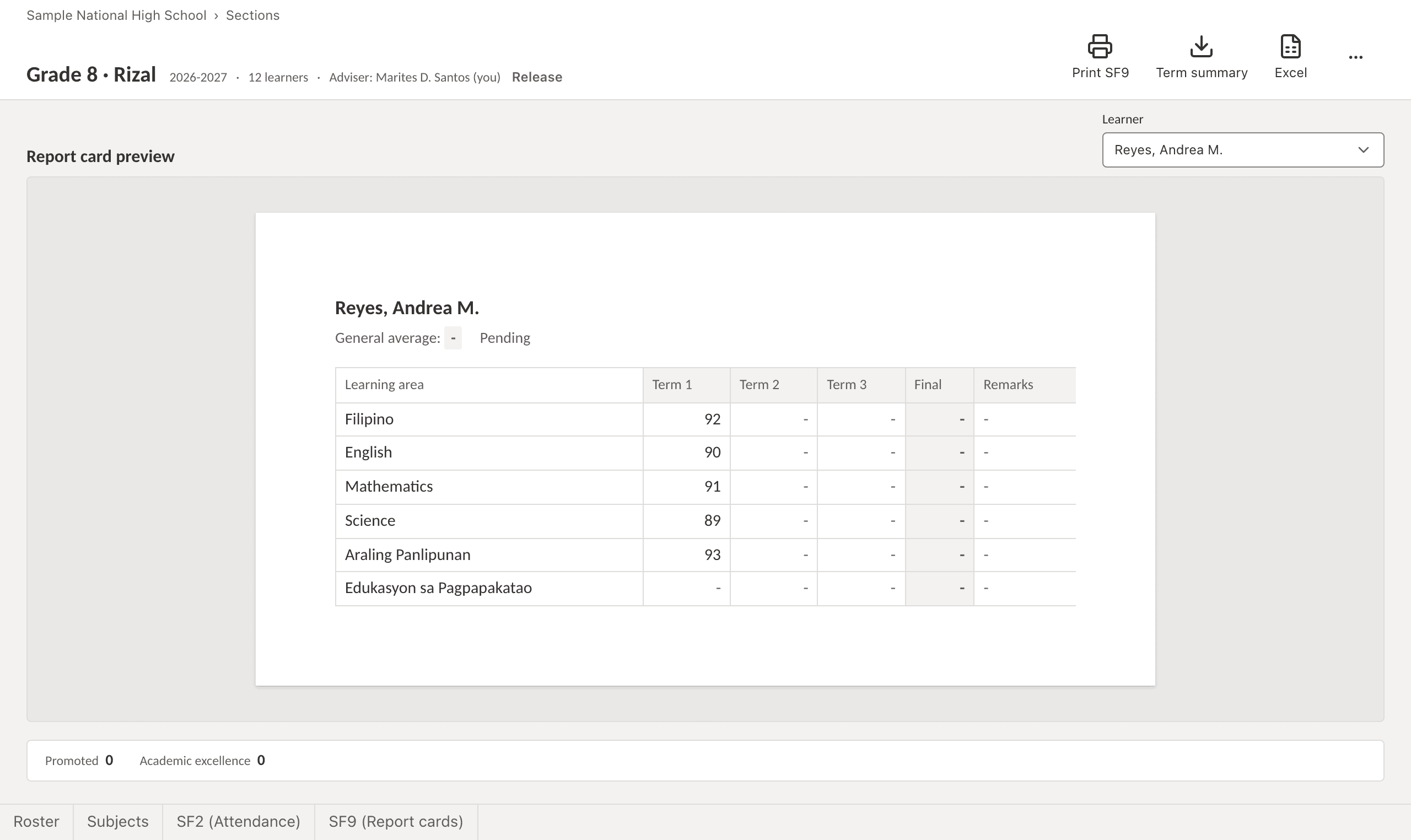
Generate SF9 (report card) data from your class record for end-of-term printing, without re-encoding scores into another file. When you finalize a term, your adviser sees your grades right away.
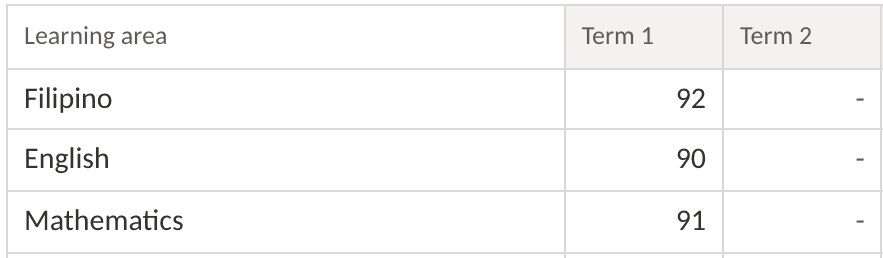
Andrea's 91 in Mathematics, in your gradebook

and on her adviser's SF9, without anyone typing it again.
The school head reviews online
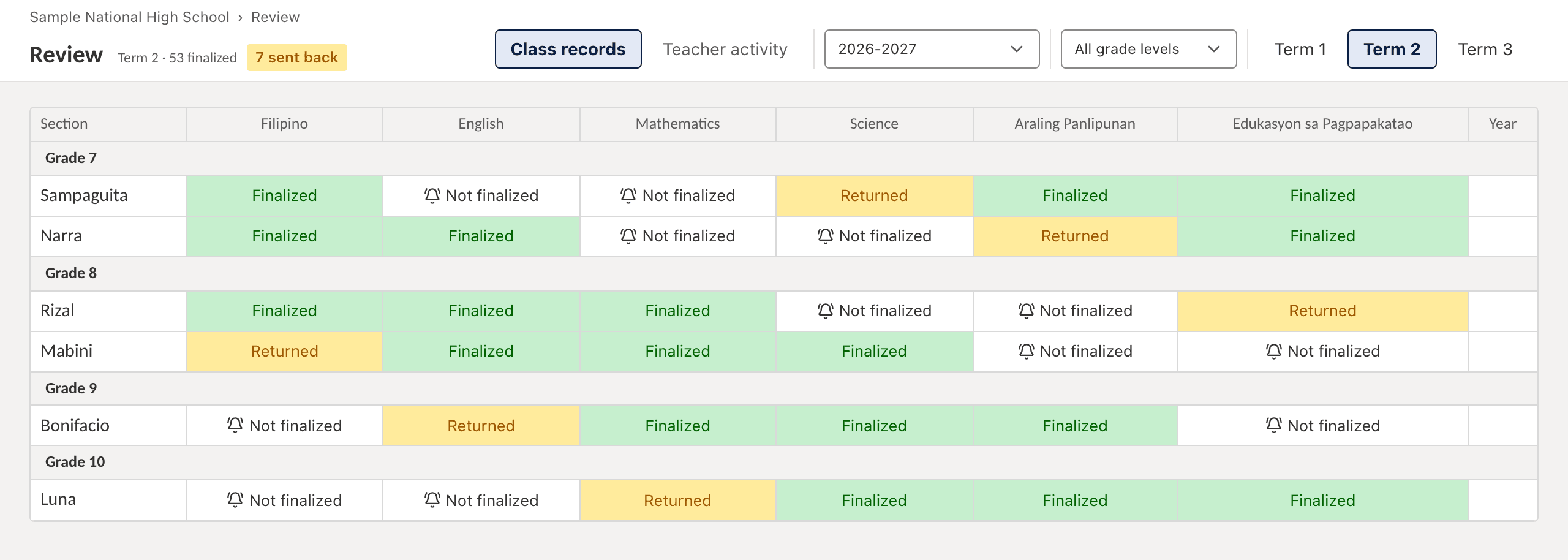
The school head reviews finalized grades online and can send them back with notes. No printouts, no group-chat follow-ups. You can reopen a submission to correct it.
Built on the new grading system
Structured around DepEd Order No. 015, s. 2026: one school year, three terms, from Grade 1 through Grade 12. The Strengthened SHS curriculum for Grades 11–12 runs on the same three-term calendar starting SY 2026–2027.
The right grading components
Written Works, Product/Performance Tasks, and Examinations (ST1, ST2, and the term exam) are tracked as separate components, the way DepEd computes them, not as one undifferentiated score list.
Learner records and attendance together
Keep your learner list, attendance, and class record in one place, shared across the school tools you already use.
Bubble-sheet tests, checked automatically
Type an answer key, print QR-coded bubble sheets, and scan finished papers with the GuroHub Scanner app. Scores flow straight into your class record.
Create the assessment
Pick the class record column it feeds (say “Grade 8 Science, Term 1, WW 2”), then type the answer key, with points per item.
Print the bubble sheets
GuroHub generates a QR-coded answer sheet for every learner in your roster. Plain paper, any printer.
Scan with the GuroHub Scanner app
Point your Android phone at the stack of finished papers. Checking happens on the phone, so no internet is needed.
Scores land in your class record
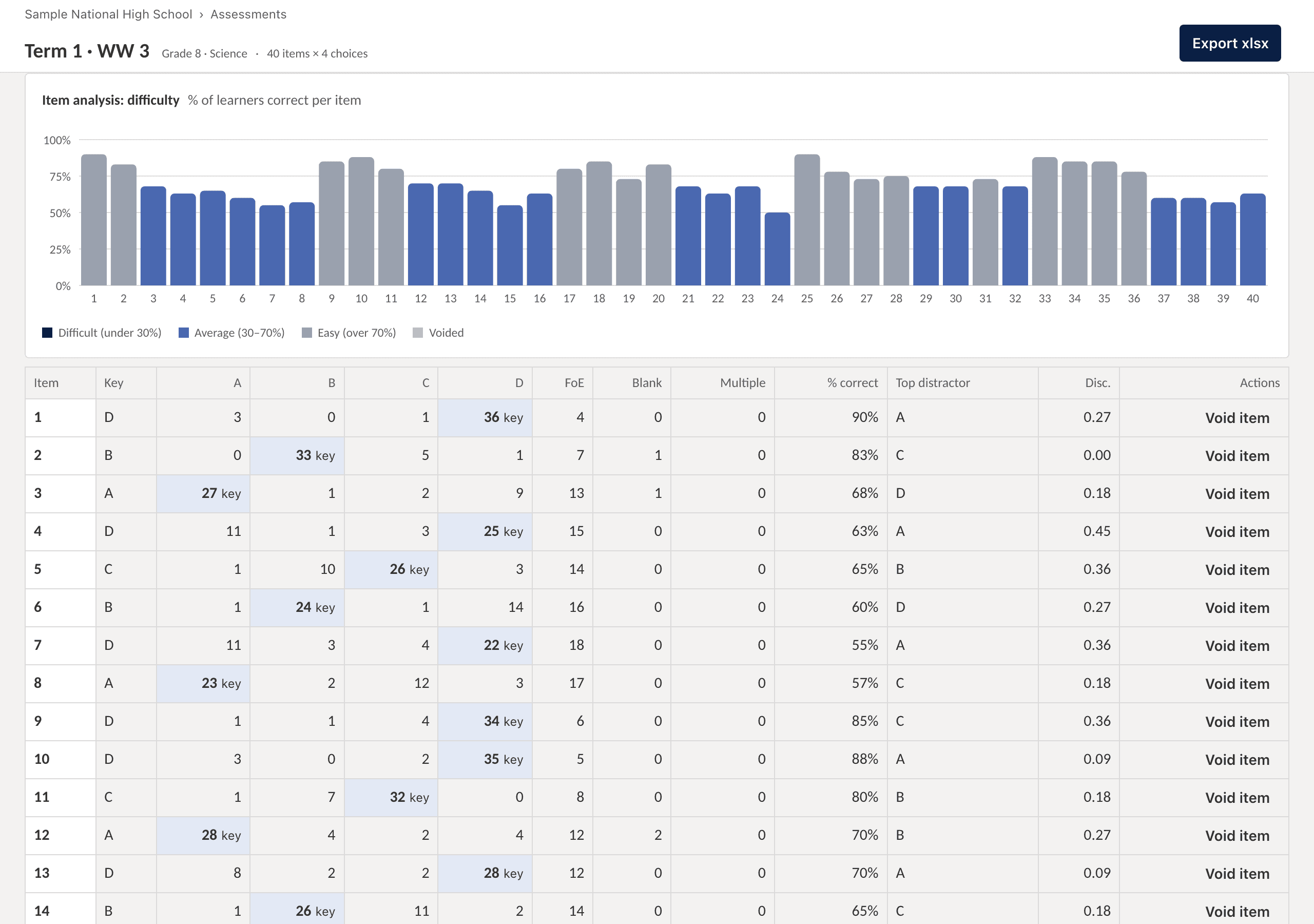
Results flow into the linked Written Works, Performance Task, or Exam column, with item analysis that flags the least-mastered skills.
Your class record shouldn't live on one laptop.
A whole term of scores is too important to depend on one device, one flash drive, or one file. Here is what changes when it lives in GuroHub.
- Your laptop breaks down
- Your record was never only on it. Sign in on any other computer or your phone and pick up where you stopped.
- You lose the flash drive
- There is no drive to lose. Your class record lives in your GuroHub account, not in your bag.
- You left your workstation at school
- Open it from home, from a friend's laptop, or from your phone. Your scores are already there.
- You are away for a seminar or leave
- Encode from wherever you are. No need to carry the school computer or email yourself a file.
- The file gets corrupted
- No “file not responding,” no half-saved workbook. Scores are saved to your account as you type.
- The brownout hits mid-encoding
- GuroHub saves as you go and tells you when “All changes saved.” You only redo what you had not typed yet.
- You type over the wrong cell
- Undo and redo are built in, on desktop and on your phone. No more “which version was the right one?”
- A formula gets broken
- There are no formulas for you to overwrite. GuroHub computes initial and transmuted grades for you.
- Too many copies: final_v3_REAL.xlsx
- One record, always current. You never wonder which file has the latest scores.
- End of the term is a week away
- Grades are computed as you encode, so the deadline is not a weekend of checking. Export SF9 data when you are ready.
- You get a new phone or laptop
- Sign in with Google. Nothing to copy over, nothing to reinstall for the class record.
- You have a stack of tests to check
- Scan the bubble sheets with your phone, even offline, and the scores land in the right column.
Start in three steps
Sign in with Google
Verify your teacher account to get started.
Set up your class record
Add your learners and scoring components per term.
Encode scores and let grades compute
Scores go in; initial and transmuted grades come out, ready for SF9 exports.
Frequently asked questions
What grade levels does it support?
Grade 1 through Grade 12: elementary (Grades 1–6), junior high school (Grades 7–10), and Senior High School (Grades 11–12) under the Strengthened SHS curriculum.
What is the GuroHub E-Class Record?
A digital class record for Grade 4 to 12 that replaces manual spreadsheet computation. You encode learner scores, and GuroHub computes grades based on DepEd's grading components.
Does it follow DepEd Order No. 015, s. 2026?
Yes. Grade 7–10 and the Strengthened SHS curriculum (Grades 11–12) run on the three-term calendar effective SY 2026–2027, with Written Works, Product/Performance Tasks, and Examinations as grading components.
What if my laptop breaks or I lose my files?
Your class record lives in your GuroHub account, not on one device. Sign in with Google on any computer or phone and your scores are there. Scores are saved as you type, so a dead battery or a brownout costs you only what you had not entered yet.
Can I use it on my phone?
Yes. You can encode scores and use undo and redo from your phone, so you are not tied to one workstation.
Can it generate school forms?
GuroHub exports SF9 (learner report card) data from your class record, so end-of-term printing doesn't require re-encoding scores into another file.
Can it check tests automatically?
Yes. Create an assessment and type the answer key, print the QR-coded bubble sheets generated for your roster, then scan finished papers with the GuroHub Scanner app. Scores are pushed into the linked class record column, and item analysis shows which competencies need reteaching.
Does the answer-sheet scanner work without internet?
Yes. Scanning and checking happen entirely on your phone, with no photos uploaded or stored anywhere, and results sync to your class record once you're back online. The scanner app is on Android, with an iPhone version on the way.
What happens when I finalize my grades?
Your adviser sees them right away for the section's report cards. Your school head can review them online and send them back with notes if something needs fixing. You can reopen a submission to correct it.